


THE SOLUTION
TIME
The platform for professional services firms that turns your team's hours into business information. Each hour is logged once, when it happens, and everything else follows: cost, billing, approval and compliance.
TIME answers the questions you ask every month
Is this project making money?
Cost and value of each hour when it is logged, at the rate in force that day.
Who is overloaded?
Each person's utilisation and how much of it is billable.
Does the month add up?
Logged versus clocked hours, and who has missing timesheets.
Am I complying with the law?
Working-time records, official calendar and audit trail, already handled.
Are the timesheets right?
A hierarchical approval level is defined for timesheets.
What about absences?
Employees report them and attach their supporting documents.
Integration with your systems: TIME connects to your company's own tools, without duplicating data or changing how you work.
HOW IT WORKS
An hour is logged once and feeds everything else
- 1Log
Each person logs time in a grid against client, project, phase and task. It saves itself.
- 2Value
Cost and value are calculated on logging, with the rate and grade in force that day.
- 3Approve
Two independent sign-offs, review and approval, with a trail of who and when.
- 4Close the month
The period is frozen and can be reopened to make corrections.
- 5Report
Business reports on the same data: profitability, utilisation, variance and more.
A calendar for everyone. Public holidays are preloaded from the official gazettes, and each employee sees only those of their region and province.
NO RE-KEYING
Nobody types the same data twice
If the data is already in the system, it is reused. These are the inputs behind every hour:
Calendar
Which days are working days?
Schedule
How many hours are expected?
Project
What do the hours incurred mean?
Clock-in
What was actually clocked?
PROFITABILITY
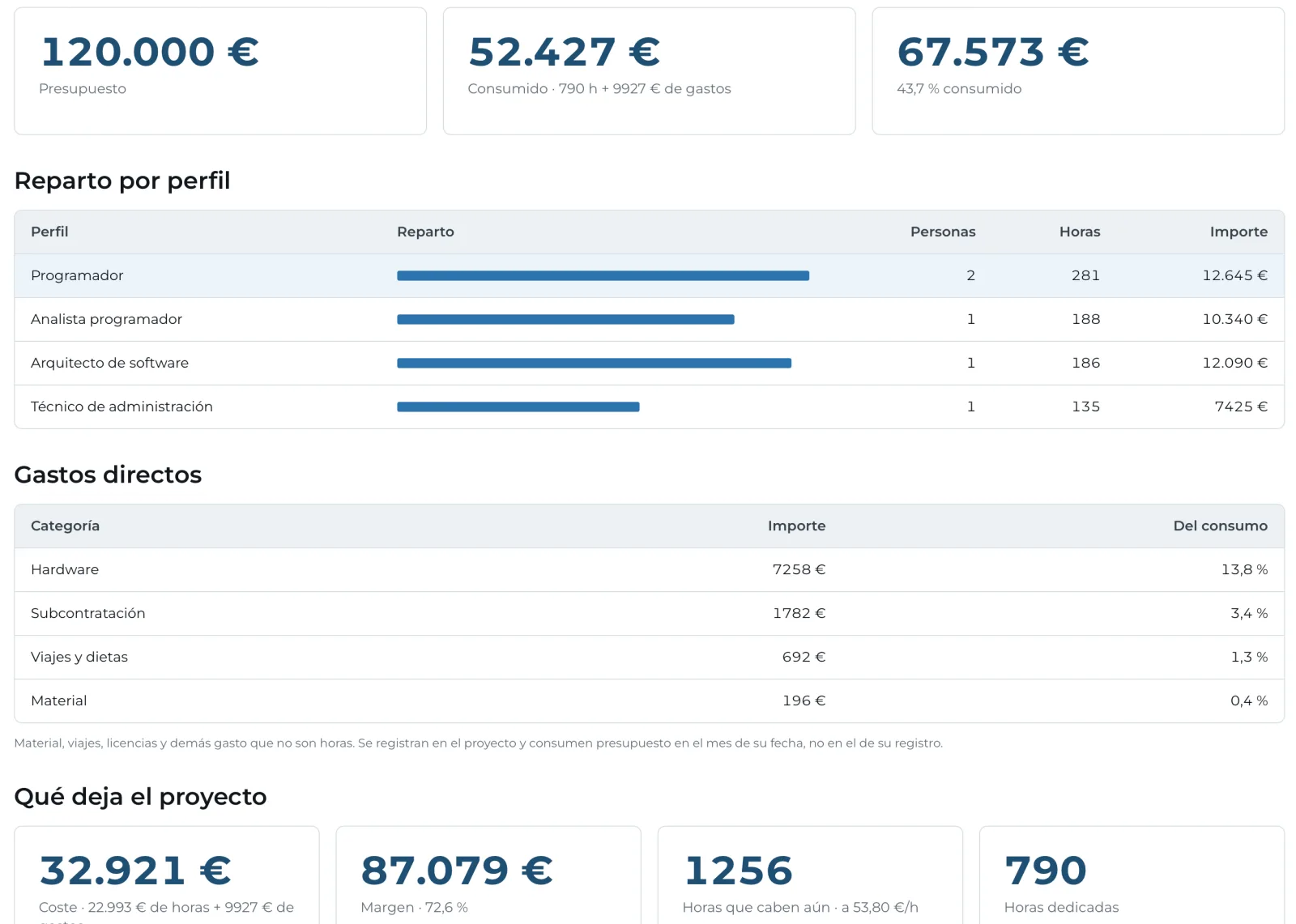
Every project, with its real margin
Project tracking
Each employee has an internal cost and each project a sale rate. Travel, software, licences or hardware can be charged too, and the remaining work is forecast.
Value on the day · not the latest
Each hour is valued at the cost in force on the day it was worked: a raise in March does not make January dearer.
By client · not just by project
Revenue, cost and margin for each client across all its projects, to decide where to focus.
Utilisation · what is billable
How much of each person's day is taken and how much of that is billed.
TIMESHEETS
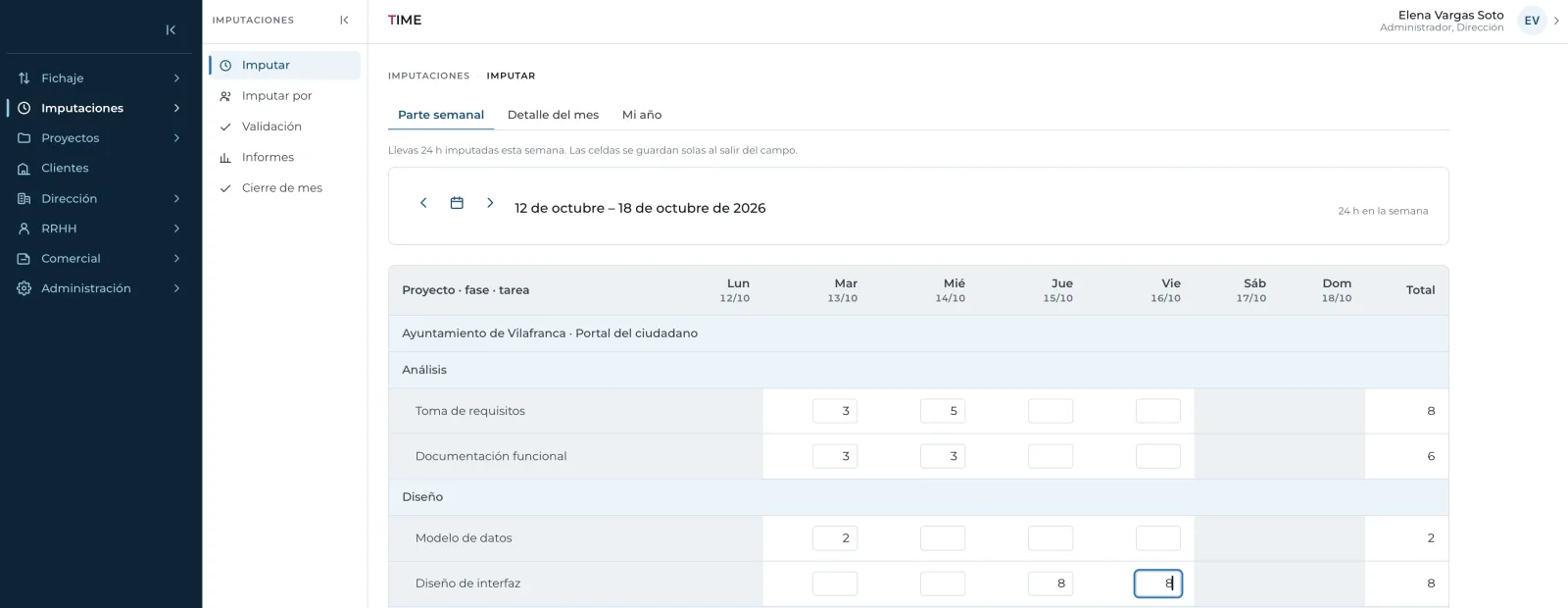
The weekly timesheet, in a grid
Project rows, day columns
Each cell saves when you leave it, with no confirm button.
Only what's yours
Each person sees the projects they are assigned to or lead, not the whole catalogue.
Two sign-offs
Review by the reviewer and approval by management, in bulk and with undo.
Impossible entries blocked
No logging in a closed month, on a holiday or on someone else's project.
Automatic reminders
If someone does not log their week, the system sends them a reminder.
REPORTS
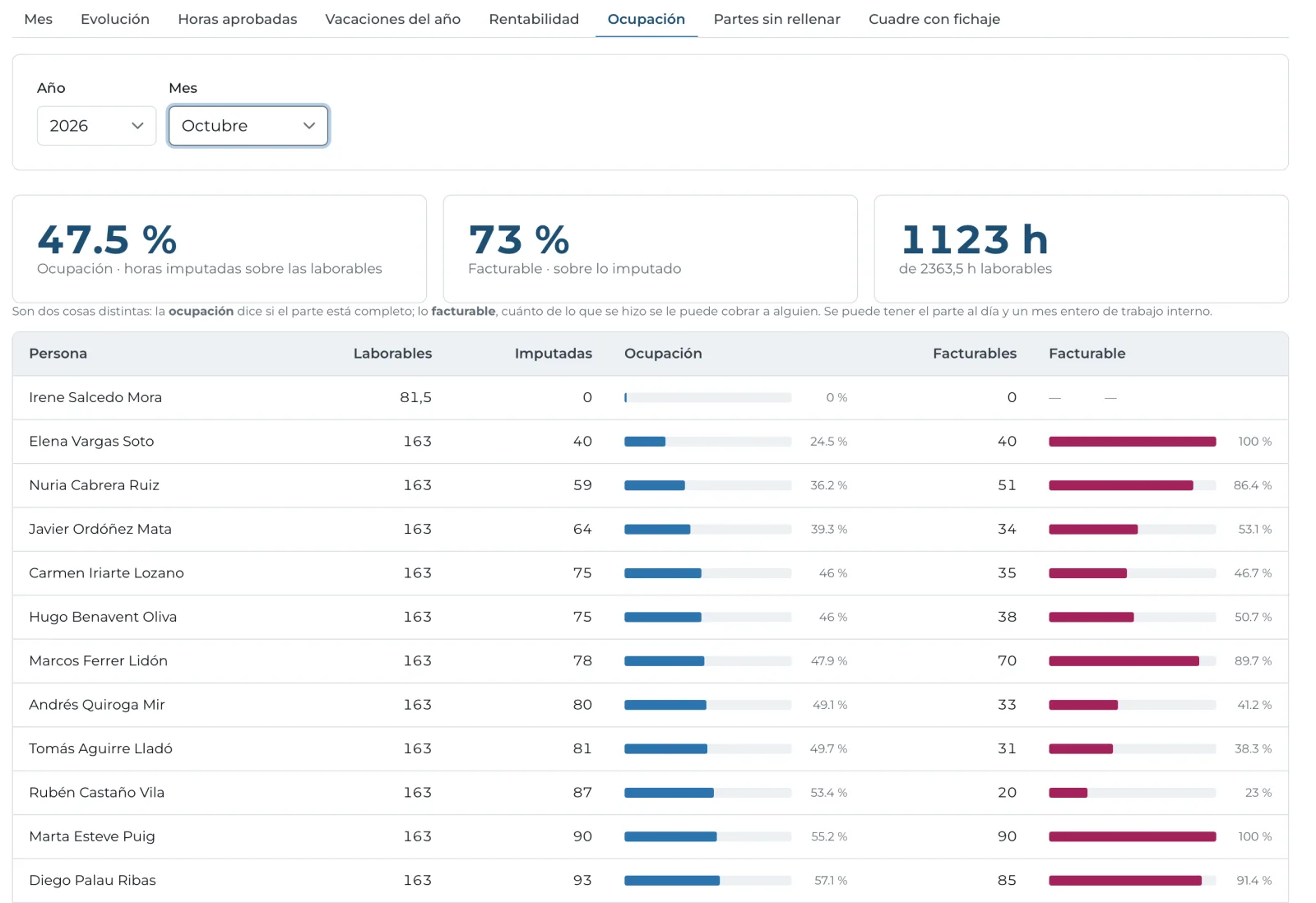
Business reports on the same data
Profitability
Revenue, cost and margin for each project or client.
Utilisation
How much of the working day is taken and how much is billable.
Logged hours
What has been logged by person, client or project.
Missing timesheets
Who has not logged time and on which days exactly.
Leave
Days taken and remaining for each person.
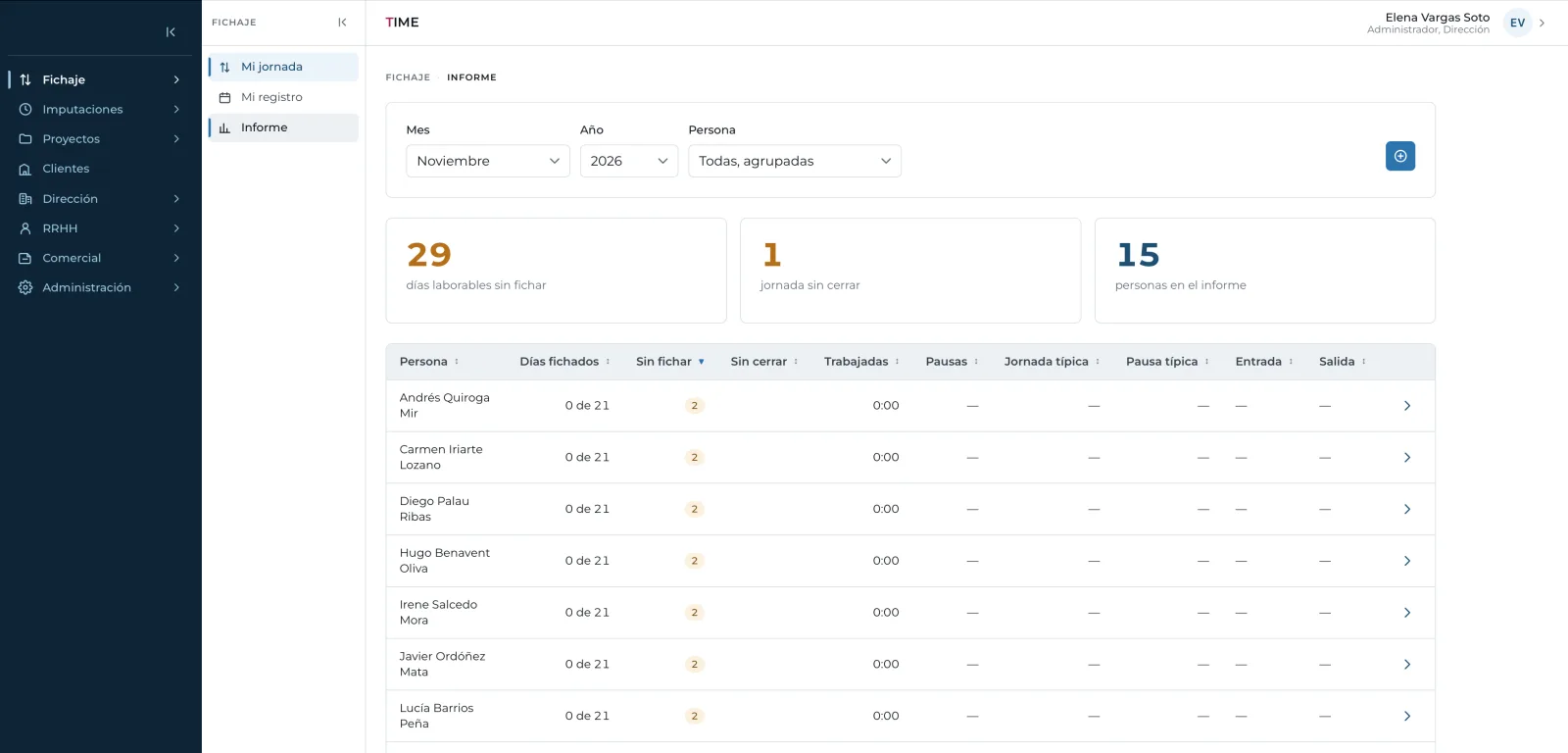
Clock-in reconciliation
Clocked versus logged hours, two records that usually live apart.
DAY TO DAY
TIME as your channel with employees
Leave and absences
Request, approval, balance and supporting documents in one traceable flow. Entitlement comes from each person's seniority; documents are pre-checked and, once approved, the absence hours are authorised.
Payslips and documents
Each employee has all their payslips at hand, plus health and safety, code of ethics and other documents. The company publishes them once.
Variable working hours
Shifts, split days or summer hours. A reduction from 10 June to 15 September is one line, and on the 16th it switches back by itself.
People and organisation: records, hierarchy, units, org chart and movement history, all in one place.
COMPLIANCE
Mandatory working-time records, built in
Working-time record
Start, end and breaks, plus the month's Excel for an inspection. If it was not clocked, it is not made up.
Work calendar
The company sets its own, with official holidays preloaded from the gazettes.
Traceability
Every write is logged: who, what and when.
Sensitive data
Supporting documents viewed person by person with no downloads; salaries behind their own permission.
SECURITY
Your data is yours alone
Software as a service
Each company with its own data, users and modules. Isolation is enforced on every database query.
Corporate sign-in
With your Microsoft 365 or Google account, username and password, or by invitation.
Full audit trail
Every change is logged: who, what and when.
Protected session
Closes after two hours of inactivity: a forgotten screen does not leave payslips or salaries on view.
Role-based: each role does only its own tasks. The company adjusts the default roles with specific permissions and scope (own, team or company), without paying for development.
Built for: Consultancies, engineering firms, law and accounting firms, and professional services companies.
FAQ
Frequently asked questions
Straight answers to what we're asked most.
Does TIME cover Spain's mandatory working-time records?
Yes. It records start, end and breaks, includes the work calendar with official holidays and produces the month's Excel for an inspection.
How do I know whether a project makes money?
Each hour is valued when logged at the cost and rate in force that day, and expenses such as travel, licences or hardware are added. TIME shows revenue, cost and margin by project and client.
Does it integrate with our tools?
Yes. TIME connects to your company's own systems without duplicating data, and supports Microsoft 365 or Google sign-in.
How is it rolled out?
In phases: timesheets and projects first, then the other modules, starting from your staff, clients, projects and collective agreement.
Want to see TIME with your data?
We'll show you with a case like yours.